We see a lot of families come to our assisted living homes experiencing ‘Sandwich Generation Overwhelm’. They are caught between taking care of elderly parents and growing children at the same time. Did I mention that most of the families we see are also working full time? For many people, the burden becomes too much. Women seem to take the brunt of all these duties. Two weeks ago we tried to help with our
articleon how to make the assisted living transition as easy as possible.

This week we want to provide information on how someone caught in the Sandwich Generation can help organize the multitude of tasks that face them.
Before we go any further, let me just say how inspiring it is to see people take on all these challenges. The tremendous amount of love these sandwich generation families show to each other is incredible. There really should be a national holiday to salute these caregivers!
This blog post is my personal tribute to these wonderful people. People who care deeply about their families and do everything they can for them. Everything, however, doesn’t seem to be enough. I hope it can help.
Why Sandwich Generation Overwhelm Exists
You would think that the Sandwich Generation would have to ‘get things done’ out of necessity. They have tons of ‘To Do’ lists that they are constantly crossing off. They probably do.
Here is one Caregiver's tale from the Sandwich Generation:
https://www.youtube.com/watch?v=RHTh9C9qviw
The trouble is Generation Sandwich tries to get
EVERYTHINGdone. All at once practically. Because it may be due right now. That’s where the Sandwich Generation ‘Overwhelm’ comes in. Not only do you feel like you can’t get it all in. You also have this nagging feeling. There are many things you should be doing that are falling through the cracks.
Some of them can be very important:
- Making sure your parents take their medicine
- Making sure your sick kids take THEIR medicine
- Putting parent’s finances in order
- Feeding both parent’s and kids
- Completing that project at work by the deadline
- Childproofing your home
- Parent-proofing your home
- Creating that ‘critical’ presentation for your boss
- Oh and still spending some time with your spouse
Any of these important tasks and more can slip through the cracks when the demands mount up.
A ‘Getting Things Done’ Solution for the Sandwich Generation
There is a system that may help. It is based on human psychology and how we process information. The whole idea is that our brains are not meant to hold a list of ‘To Do’s’. Our brains are much more efficient at coming up with ideas. The brain is much less efficient at keeping track of the idea until we implement it.
Once we have the idea, we should put it in a list. We shouldn’t just try to remember it. Sounds simple enough.

Just make a ‘To Do’ list. Has that worked for you Sandwich Generation families out there? The list just keeps growing. You cross one task off, and add three more.
Let me introduce you to another system. The system’s creator,
David Allenhas spent a lifetime coaching high-performers. From CEOs to movie stars, Mr. Allen has helped them become much more organized and effective. Those high-performing people probably have about the same (or maybe
less) to do than members of the Sandwich Generation.
His system overall is simple. He believes in getting everything out of your head and putting it down on paper. Or in a computer through software. Or on your phone on an app. That includes
EVERYTHING.
Implementing ‘Getting Things Done’
What follows is just a summary of the ‘Getting Things Done’ (GTD) system to see if it would be right for you. I highly recommend buying David’s book,
Getting Things Done, to fully implement the system. They also have
coachingworldwide. You can access the coaching from David’s website.

Ideally you should take a day to start implementing the system. Preferably a weekend or Friday night when the distractions are minimal. It probably seems like many of you in the Sandwich Generation never seem to have a day off. All the more reason to find some time to implement this system. It will help keep your sanity in the long run.
Ask your spouse to watch everyone for a day. Or hire a babysitter or a home care provider. See if other family members will help. It’s time to take a day and get organized.
There are five steps to begin implementing this system:
- Collectthings that command our attention (Feel like you have a few?)
- Processwhat they mean and what to do about them
- Organizethe results, which we..
- Reviewas options for what we choose to…
- Do
Collecting
On the implementation day, gather
EVERYTHINGthat needs attention (not including your actual relatives). Put it all together into an ‘inbox’. It could be a wire basket on your desk, or just a big pile of ‘stuff’. Take a stack of computer paper and put it by the inbox as well.
The whole emphasis of the system is to get everything out of your head, and down on to paper. It's your list of things to do you keep in your head that creates that overwhelming feeling. If you have any doubt as to whether to include any item in your inbox,
INCLUDE IT!
Write down all your ideas – one idea per piece of paper. Then put it in your ‘inbox’.

Print out emails as well. Or at least have an ‘electronic inbox’ for them. Anything that is floating around your house, your office or your head should be put in the inbox. This includes but is not limited to:
- Papers that need to be filed
- To Do lists
- Bills to pay
- Stacks of business cards
- Family birthdays and special events coming up
- Shopping lists
- People you need to call
- Tasks that have been sitting out there or been pushed off
- Long range plans (college savings, vacations – maybe not for the sandwich generation, etc.)
- Stuff you’re waiting for other people to do
Collect everything you consider ‘incomplete’. The system calls these ‘open loops’. Everything that has not been finalized, organized and put away so you don’t need to think about it anymore is an open loop.
Tips for Collecting Everything
David recommends three requirements to make this collection phase successful:
- Every open loop much be in your collection system and out of your head
- You must have as few collection buckets as you can get away with.
- You must empty them regularly.
Process
Here is where the system differs significantly from the traditional ‘To Do’ lists. You may have done something similar as the ‘Collect’ step and created a To Do list from it. All that does is create a list of all that stuff. With GTD you actually process the list to determine how best to attack it.
There is a
workflow diagramto show how the system works. The boxes highlighted with bold shadows behind them indicate the ways to process the information.
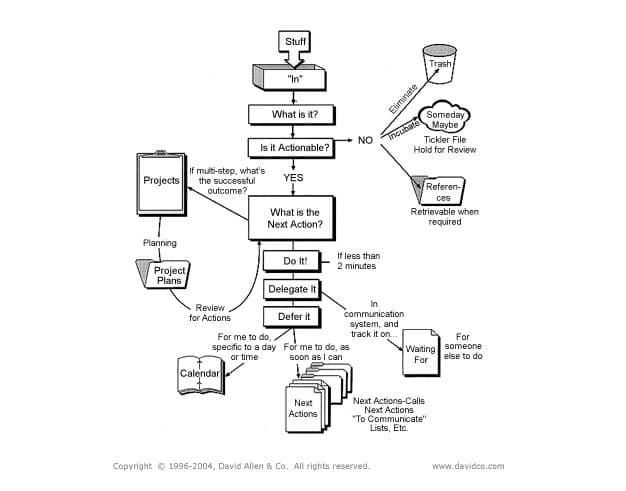
The first action you should take for each item in your inbox is to ask yourself ‘What is it?’ Once you understand what it is, ask yourself
‘Is it Actionable?’
The answer should be a simple yes or no.
If it’s ‘No’ there are three things you can do with it:
- It’s trash. Throw it away. You’ll need a trash bucket or <Del> key on your keyboard.
- No action right now, but you might need to do something later (plan a birthday party six months from now). A calendar can store information on these items and due dates. Or just file it as a ‘Someday/Maybe’ item.
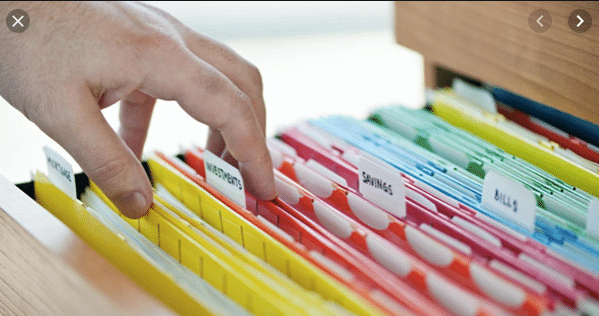
- It’s potentially useful information you want to keep as reference – Time to set up that filing system (which could be one of the items you collected in the first step)
If the item is actionable, you need to determine two things:
- What is the project or outcome you want and will commit to? And
- What is the nextaction required?
If you can’t put the action to bed in one action, it becomes a project. Part of this system requires you to put together a projects list. Those are all your ‘To Do’s’ that require more than one action. Each project should have a ‘next action’ you can accomplish. Once all the next actions in a project are complete, the project is complete.
Organize
Once you have processed all your ‘open loops’, it’s time to organize them. If you look at the
GTD diagram, the eight outer squares are the possible ways you can organize everything.
We’ve already talked about the ways you can organize the non-actionable items. You can trash it, add it to a calendar or put in the Someday/Maybe file. Or you can just file it away as reference material.
For the actionable items, you will need:
- A list of projects
- Storage or files for project plans and materials
- A calendar
- A list of reminders for next actions and
- A list of reminders of things you’re waiting for
As you can see, you organize the overall ‘To Do’ list into several different lists. You can do this either with a pen and paper, or electronically. Here is a breakdown of each ‘list’:
Calendar
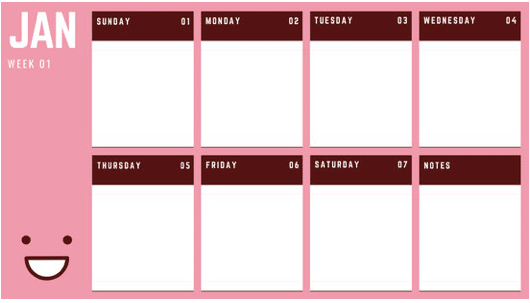
Reminders fall into two categories – things that need to get done at a certain date and time, and things that just need to get done as soon as possible. The calendar is for the former. The following are things to put on your calendar. Don’t put ‘Daily To Do’ lists on your calendar. They don’t work. They only make you feel bad that you didn’t get them done by a certain date:
- Time-specific actions – Basically appointments. Something where you need to be somewhere at a specific time.
- Day-Specific Actions – Tasks you need to do sometime on a specific date, but not a specifictime.
- Day-Specific Information – Put information on your calendar that will be helpful on a certain day, but not necessarily something directly actionable. This category may include directions to appointments. It also could be information you want to discuss with someone on a certain day. Or activities other people may be doing on a certain day.
The Next Actions List
This is the list where you might have put ‘Daily To Do’s’ on your calendar in the past. These are actions you will do as soon as you have the chance. They should take longer than 2 minutes. If you have an action in your inbox that will take less than 2 minutes,
just do it. Don’t bother organizing it. If you only have 20-30 actions on this list (doubtful for you sandwich generation folks), just keep one list. For those people with significantly more, you should consider dividing the list into categories such as ‘Calls’, ‘Errands’, ‘Topics to talk to Parents’ etc. That way you can knock out a whole bunch of items at once if you are in the right place to do them.
‘Waiting For’ List
This list can be a huge help for people suffering from Sandwich Generation Overwhelm. If you are experiencing an overwhelming about of things to do, see if you can delegate them. Sorry about the shameless plug, but that is why we have an assisted living business. Feel free to delegate the care of your aging parents to us or someone like us. Or at least hire some in-home help. Your kids are probably too old to have babysitters if you’re caring for your parents. Maybe the kids can help take care of your parents for a while. Or run errands. Or take them to the doctor.

The ‘Waiting For’ list is the one where you keep track of all the tasks you have delegated. Or maybe you are waiting for someone else to get something done before you can do your part. The list ensures these tasks don’t slip through the cracks.
Two tips for the ‘Waiting For’ list. Number 1 is to write down the name of the person who is responsible for doing it. This is especially good for electronic lists. You can then sort by their name when you go talk to them and make sure you cover everything. Number 2 is to write down the date you started waiting for the item. Then you can remember how long you have been waiting.
Someday/Maybe
There is one category of non-actionable item that needs a list. It’s your Someday/Maybe list. This would include things like ‘Vacation in Bora Bora’, ‘Learn French’ or ‘Retire’. You should keep this list up to date because ‘Someday’ may be here much sooner than you think.
Review (Maybe the Toughest Part for the Sandwich Generation)
In order for your brain to be clear and trust the GTD system, you need to keep it up to date. That means setting some time aside each week for reviewing your lists. I’m sure that seems impossible right now for someone taking care of several generations. Many people have found that once they set this system up, you will have more free time.
https://www.youtube.com/watch?v=yzZEVX0hXm4
You’ll find with this system that you will be doing mini-reviews all week. Many people check their calendar in the morning or night before to plan their day. Or if you have some free time and a phone nearby, you can review your list of calls and knock out a bunch at once. This should help you knock out potentially large amounts of tasks at once.
Take a couple hours on the same day each week for the big review. It could be early Saturday morning. Or Friday afternoon at work when work is slow. There is an advantage to doing it Friday. If you find something you can do quickly, many businesses are still open to help when you contact them. If you review Saturday morning and need to set up a Doctor appointment, for instance, you’ll have to wait until Monday.
How to Conduct Your Review:
- Look at your calendar – Review the past weeks calendar for follow up actions and next weeks for what is coming up. Do you need to prepare anything for upcoming events?
- “Empty Your Head” – Just as you did when you set this system up. Try to write down everything that you need to take care of. Then put all these things into your inbox.
- Review ‘Projects’ and larger outcome lists. Make sure you have one action step in each project that is on one of your action lists.
- Review ‘Next Actions’ list – Check off the completed actions and think about other actions that should be added.
- Review ‘Someday/Maybe’ list – Transfer anything that could now be an active project. Delete anything that is no longer interesting.
- Pending or Support files – Files that go with your projects. Are there any new actions they trigger?
- Think about new ideas or projects that you would be good to accomplish. Add them to the lists.
Do
Once you have everything organized, you will be able to ‘Do’ your ‘To Do’ list much more effectively. When you’re near your phone, you can pull up your call lists and make lots of calls. Out running errands? Pull up your errand lists and knock them all out at once. Eating breakfast by yourself? Review your ‘Waiting for’ list to see who you need to bug to get their task done.
You’ll find you will be completing your lists much faster and more effectively when they are managed according to the GTD system. Software is wonderful for pulling up lists of similar tasks like phone calls or errands. You can purchase books at the
GTD websitefor a very low cost (around $10) that help you implement GTD with a host of software programs.
We know how difficult it can be to manage several generations at once. And you are a saint for doing so. We see it every day with families coming to our homes looking for help. Hopefully this system will help you overcome those overwhelming feelings. If we can contact you in any way, please don’t hesitate to reach out for further help.
You can see the original post on our
website.
 Both the website and app contain the latest guidance from the Centers for Disease Control (CDC), The White House-led Coronavirus Task Force, and the Federal Emergency Management Agency.


 Today Surprise continues to grow. If you live in Surprise, you probably see it all the time. Lots of great shops and businesses are moving into the area. If you’re thinking of moving into the area, we believe you will really enjoy what you see.